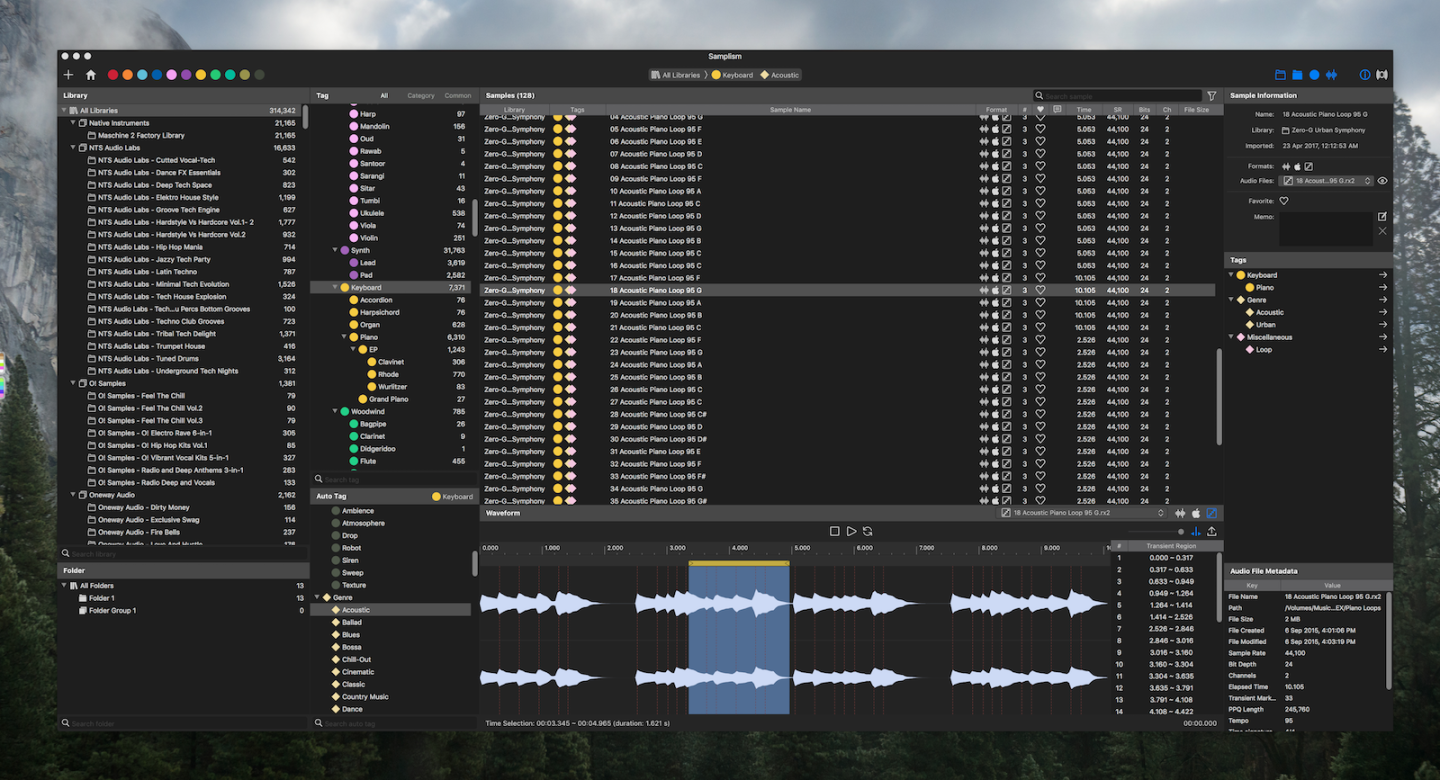

A smarter way to manage your audio samples
Samplism is a revolutionary audio file organizer that helps you quickly organize, preview and search for your audio samples.
What’s New in Samplism 1.9.3?
Introducing the Floating Waveform view
BGM: “WoW!” by Lovelyz (https://youtu.be/a1ENnG-s630)
Video Demo
BGM: Instrumental version of “Ah-Choo” by Lovelyz (Produced by Yoonsang)
(https://www.youtube.com/watch?v=wf1Ngv060KI)
(Original song: https://www.youtube.com/watch?v=v7qisJ_KuYI)
Purchase Samplism (v1.9.10)

Demo version : Click to download
Get Samplism Lite For Free (v1.3.10)
Features Comparison
| Samplism Lite | Samplism | |
| Price | Free | $59.99 |
| Maximum allowed number of samples | 50,000 | Unlimited |
| Library Support | O | O |
| Folder Support | X | O |
| Automatic Tag Matching | O | O |
| Manual tagging | X | O |
| Supporting macOS tags | X | O |
| Variable playback tempo & pitch | Playback only | * Playback * Export |
| Drag and drop support | Sample only | * Sample * Waveform selection * Transient region |
| Import third-party library | * Apple Loops * Ableton Live | * Logic Pro X * Apple Loops * Ableton Live * Splice * Loopcloud * Native Instruments * AKAI MPC |
| Export | X | O |
| Files View support | X | O |
| Audio Unit support | X | O |
Key Features
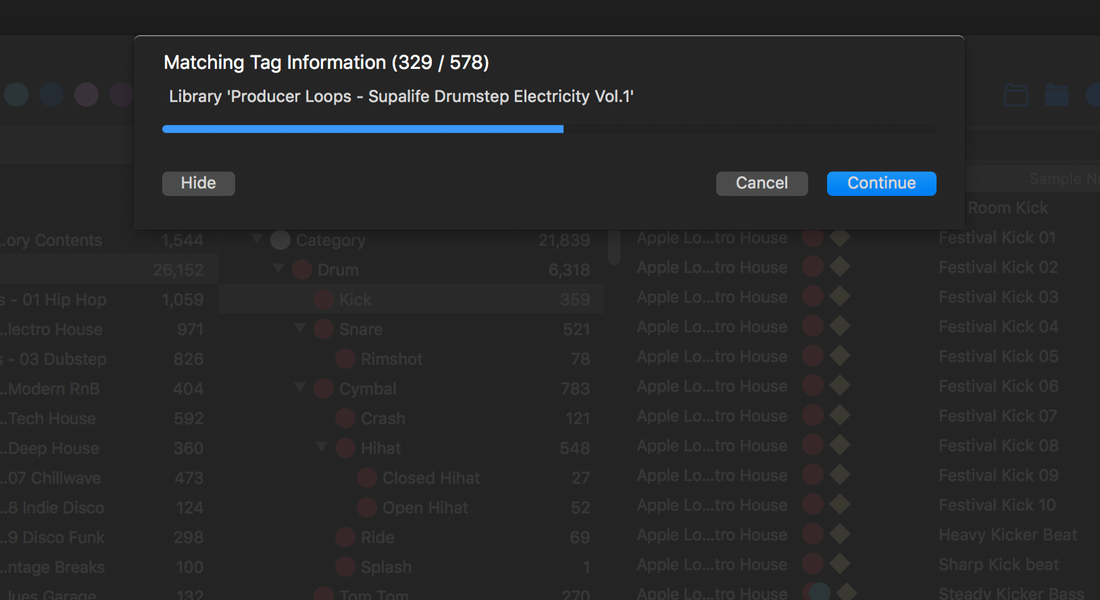
1. Automatic Tag Matching
Samplism features a breakthrough technology that automatically categorizes audio samples into tags. With Samplism, you don’t need to waste your time anymore on manually categorizing your audio files. Just drag and drop directories on your Mac into Samplism. All audio samples are automatically categorized into tags. It’s practically a magic.
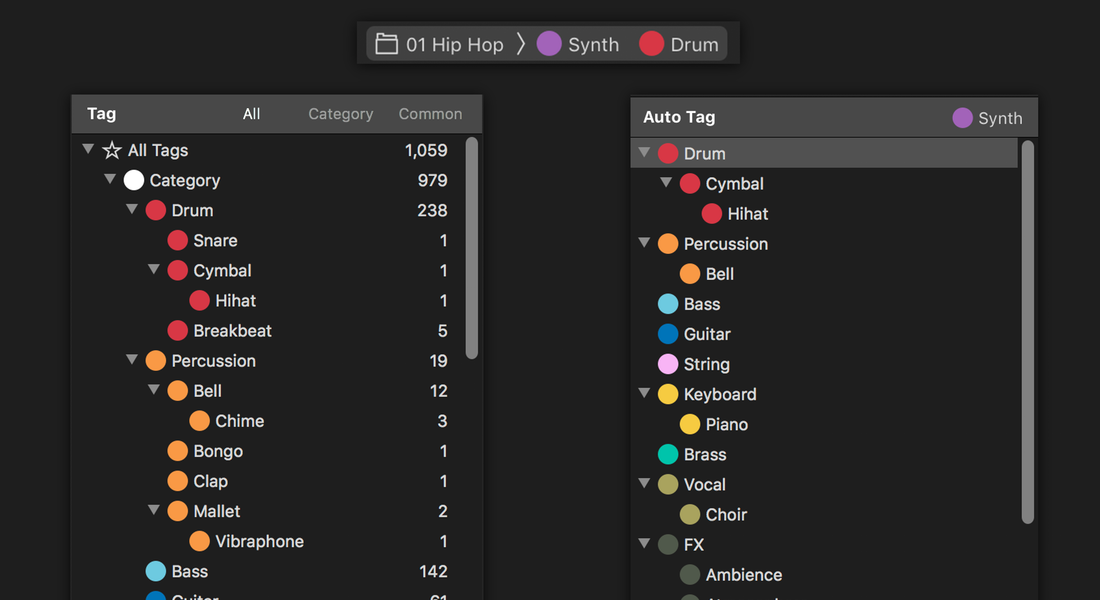
2. Search for Audio Samples using Tags and Auto Tags
Samplism provides a simple, quick and easy way to search for audio samples using tags and auto tags. By simply selecting a tag, all its corresponding samples will be shown in the Sample List. In addition, auto tags allow you to search for samples with more specific criteria.
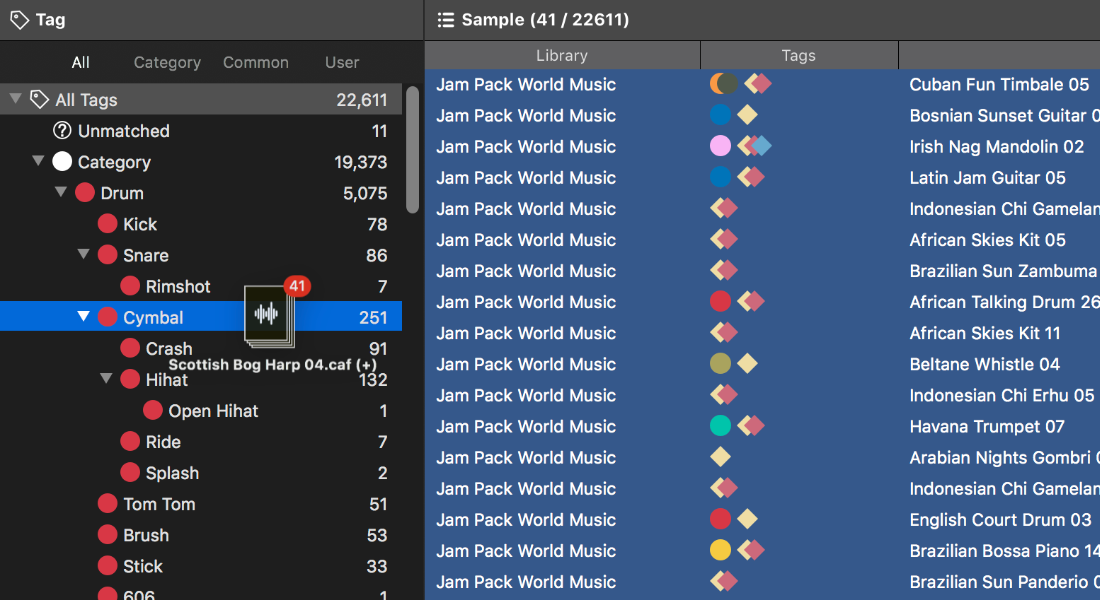
3. Manual Tag Matching
The automatic tag matching feature in Samplism allows you to quickly and conveniently classify audio samples into tags. But sometimes the matching results may not be accurate. With the manual tagging feature, you can classify samples more precisely.
4. User-Defined Tags
In addition to a rich set of built-in tags, Samplism allows you to create your own tags and group tags. With the user-defined tagging feature, you can categorize audio samples much more accurately.

5. Organize Audio Samples with Folders
Samplism provides folders and folder groups to help you organize audio samples better. Simply select audio samples in a library and drag and drop them into a folder. It is simple, quick and easy.

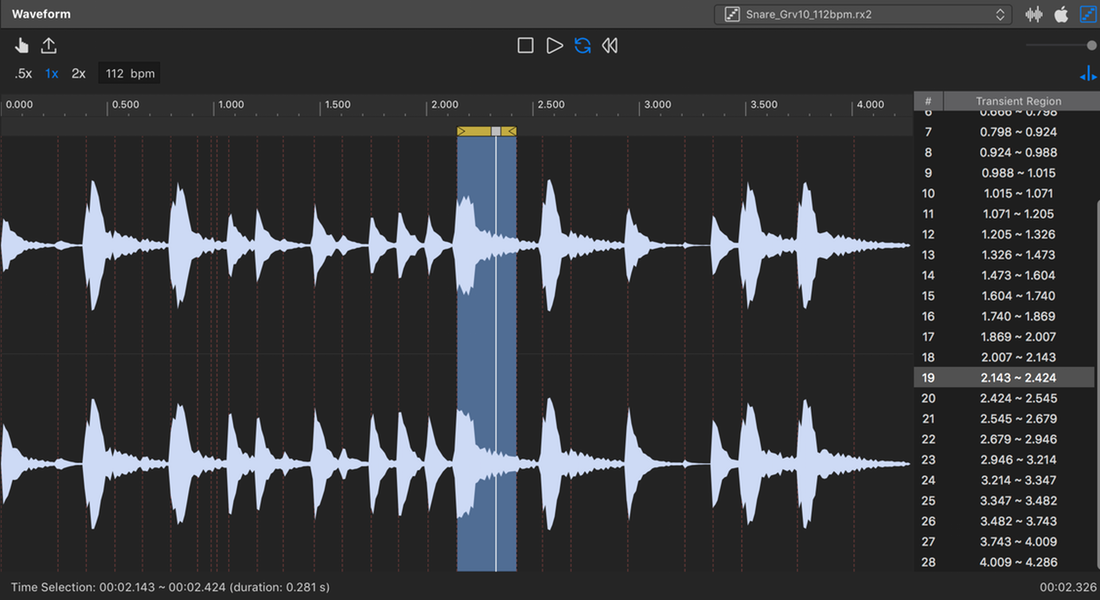
6. Advanced Sample Player
Samplism provides a simple, easy-to-use yet powerful sample player which allows you to play an entire audio file, the waveform selection, or transient regions.
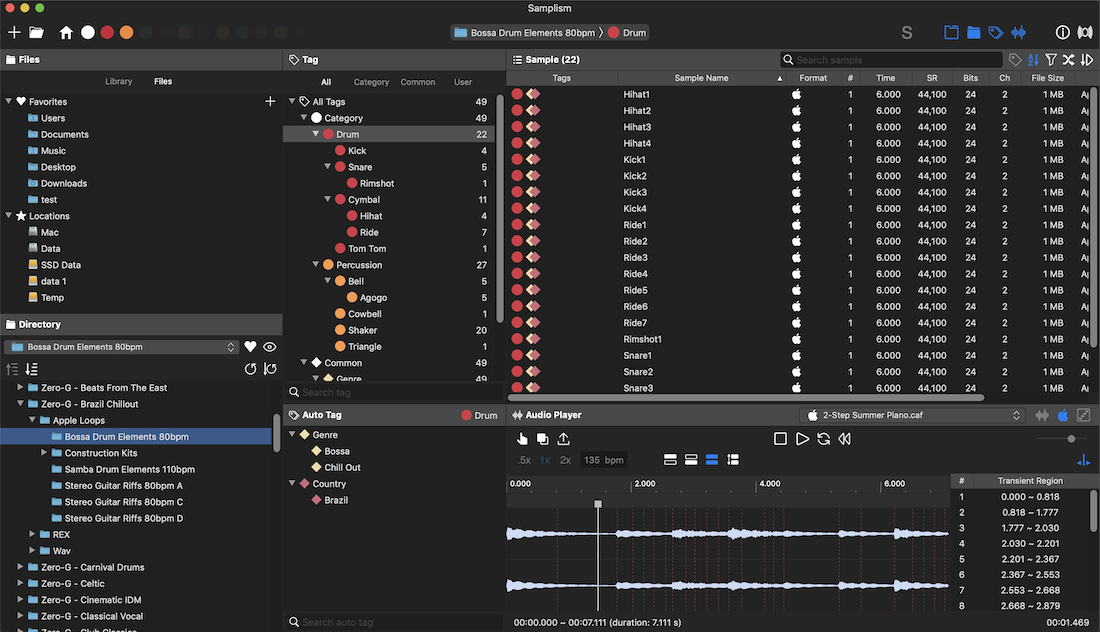
7. Files View
The Files View allows you to simply and quickly search for audio samples on a directory-basis.
8. Simplism: the Samplism mini player
Simplism is designed to use with DAWs or other audio apps together on a single monitor screen. It takes up very little space on your screen and still provides most key features of Samplism such as navigating, previewing and searching for your audio samples.

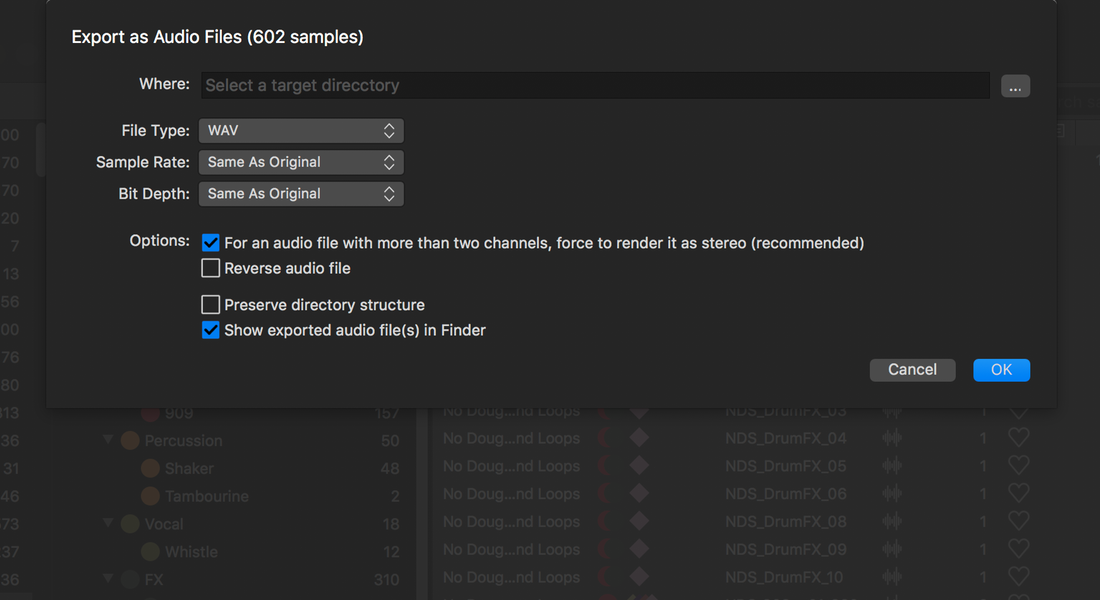
9. Export Audio Samples
With Samplism, exporting as audio files has never been easier. Simply select audio samples, the waveform selection, or transient regions. Samplism provides various export options such as file type, sample rate and bit depth. With just a click, all selected samples are automatically converted as audio files, which can be used in other DAWs.
10. Import Third-Party Library (*)
Samplism provides a super easy way to import well-known third-party libraries installed on your Mac. Samplism automatically detects well-known third-party libraries, so you don’t need to worry about finding the directory location of third-party libraries. No setup is required. All you have to do is to simply import them with just one-click.
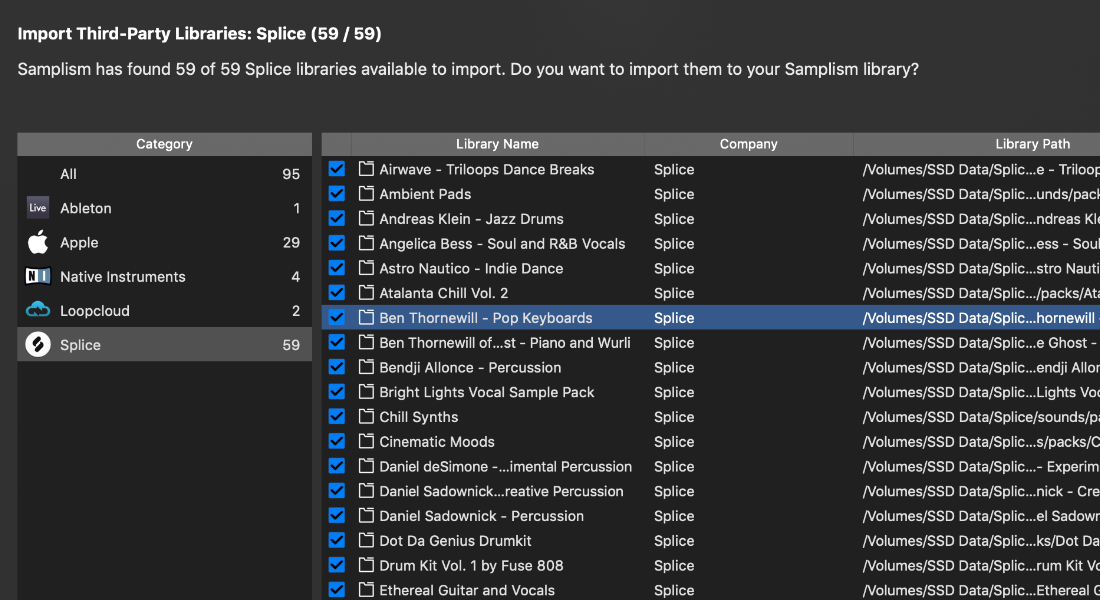
(* Logic Pro X, Ableton Live, Native Instruments, Loopcloud, Splice and AKAI MPC supported)
11. Working with DAWs
Simply drag and drop audio samples, the waveform selection or transient regions into DAWs. It just works. A powerful drag and drop feature in Samplism greatly improves workflow and increase creativity. Sampling has never been easier with Samplism.

12. Working with Audio Units
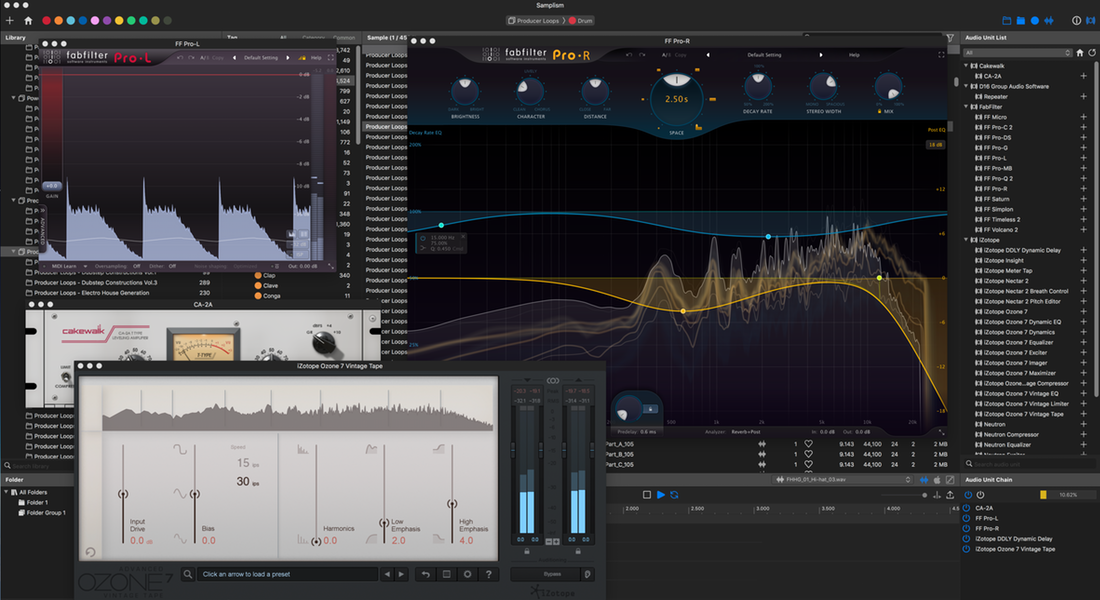
Samplism supports Audio Unit effects. By selecting the Audio Unit View, Samplism scans all Audio Unit effects installed on your Mac and shows them in the Audio Unit List. All you have to do is to preview audio samples with Audio Unit effects applied, tweak the plugin parameters and enjoy the sound.
13. Built for Mac
In order to provide the best performance and responsiveness, Samplism takes full advantage of the latest macOS technologies including Core Audio, Core Animation, and Grand Central Dispatch, and is fully optimized for 64-bit and multicore processors.
Minimum System Requirements
- macOS 10.13, or later (*Fully compatible with macOS Sonoma).
- Native support for Apple Silicon Macs.
- Requires 64-bit Audio Units plug-ins.
Release Notes
Samplism Release Notes
Samplism Lite Release Notes
 Audio Helper Project
HI,
Samplism is a great program. But it would be really nice if it could index ID3 metadata (artist, comment, album), because these data are stored in tracks. I use to put info in comment because it can be used in most softwares. I don’t want to rely on a specific software database.
Also I noticed a bug with accented letters (i’m french) : a file name like “générique” can’t be find typing “générique” nor “generique”.
LikeLiked by 1 person
Hi, William.
Thanks for your bug report.
We will check the issue.
LikeLike
Wow, I absolutely love this software, finally I can categorise my samples with ease.
I just have a question and possible suggestion if this is not already a feature. Does the classification model learn from my tagging samples manually so that a re-scan would pick up other similar samples and tag them too? If this isn’t already a feature then I’m sure it would be amazing, particularly with user-defined tags. If it is a feature, please could you let me know how to do this.
Also, not sure if you’ve thought of this too but would be amazing if you could select a sample and it give you the option to show all other sonically similar samples. Anyway keep up the great work!
LikeLiked by 1 person
Hi, James. Thank you for your interest in Samplism.
Although we cannot tell you the details yet, we have a plan to significantly improve the tagging features in Samplism in many ways.
Please look forward to the future updates.
Thanks again!
LikeLike
Hi, I just bought Samplism, it’s great and fast, but I also have some ideas of improvements I’d like to see, in addition of what has already been said :
– a manual (is there one already ?)
– the waveform : a zoom fonction, and I also have a problem with large samples (songs) that have a very little waveform
– ability to disable the “automap” tags function for the new added samples
– an “artist” category, and the ability to sort by it
– an option to choose to not to see the “failed to open” samples. Maybe by disabling the offline librairies. For two reasons :
1 : I work with two sample places : internal and external. Most of the time I don’t need my external drive and in that case if I look in all librairies, all tags, I don’t want to scroll, search which samples are here and which ones are “failed to open”.
2 : In a lot of ableton factory packs, the samples can’t be opened in other application than ableton
Anyway thanks for that software 🙂 (and sorry for my bad english)
LikeLike
“I work with two sample places : internal and external. Most of the time I don’t need my external drive and in that case if I look in all librairies, all tags, I don’t want to scroll, search which samples are here and which ones are “failed to open”.”
THIS Please
LikeLiked by 1 person
Hi, again 🙂
Don’t know if this has been covered, but:
1. If I create a new library and import a folder that contains subfolders containing libraries I get the question if I want to create individual libraries or just one for the root folder. If I select the just one option and later change my mind Samplism seem to remember that choice. In other words, if I delete the one library and try to re-add it but also include the subfolders I never get that option-dialog again. Any way around that?
2. I have all my samples sorted on disk like this: SAMPLEPACKS/COMPANY/LIBRARY. I want to add the whole SAMPLEPACKS folder to Samplism so that new packs from new companies will be added automatically. This however doesn’t work properly with the library tree in Samplism. If I add the libraries like this I get in Samplism: COMPANY (from physical folder)/COMPANY (tagged by Samplism)/Samples. I don’t get the individual libraries specified in the tree. If I add the physical library folder directly to Samplism the tree displays correctly. Can this be fixed so that Samplism ignores the first to folders and only add the COMPANY (tagged by Samplism/LIBRARY?
3. Any way to select and delete all libraries from the Samplism GUI? Deleting them one by one is kind of annoying 🙂
Thanks!
LikeLiked by 1 person
Hey Matt.
re.1 :
I’ve not noticed this so far, but possibly haven’t followed this route much.
re. 2:
I’m curious to see what the Samplism guys say about this, as I have been in contact with them previously about tree structure retention/not, in the app. My situation re. folder organisation is different to yours, but still, I am having frustrations with non-retention of folder tree structures etc when importing. I have got a work around now, for my particular requirements but it’s not ideal.
re. 3:
Absolutely agree – no option to multiple select is something I would love to see sorted out 😉
LikeLiked by 1 person
Hi, Matt.
Really sorry for the late reply.
1. Samplism does not remember your last choice for each directory.
2. Regarding this, we have a plan to add a new feature [Files] tab that allows navigating a library’s subdirectories (like in the Finder).
3. In the next “major” update, we will consider adding a feature to select multiple libraries and folders.
LikeLike
Coming from the slow, greatly unsupported AudioFinder, Samplism is an awesome tool for my workflow. Cubase’s Media Bay is way too slow on Mac and almost unusable.
Please keep your software active for many years in the future, I have seen similar software vendors starting enthusiastically and then gone in to the oblivion. Your software is groundbreaking and I am really happy I have bought it. *****
Future request: a file spot in DAW would be great (feature AudioFinder has). I know that Steinberg are d*ckheads and would not cooperate as they did not with the AudioFinder, but it would be worth a try.
LikeLiked by 1 person
Hi, Ile. Firstly, we are so glad that you like Samplism.
The [Spot to DAW] feature that you suggested seems to be great.
We will see if it is implementable in Samplism.
Thank you for your great suggestion and please look forward to the future updates!
LikeLiked by 1 person
One more question if I may. A friend of mine who uses Windows was impressed with Samplism, will there be Windows version in the future?
LikeLiked by 1 person
One more question if I may. A friend of mine who uses Windows was very impressed by Samplism. Are there plans for Windows version in the future?
LikeLiked by 1 person
Hi, Ile.
Unfortunately, our team has currently no plan to develop the Windows version of Samplism.
It is obvious that we don’t know what life will be like, but we definitely know that the Windows version of Samplism will not be released.
LikeLike
AMAZING!
The only feature that I would still need would be the ability to sort samples randomly.
I have a lot of samples and that would be amazing to find new stuff in my samples!
Keep up the great work!
LikeLiked by 1 person
Hi, Sam.
We definitely have a plan to support sorting samples by various criteria.
Please look forward to the future updates.
Thank you!
LikeLike
(The comment did not appear so I have reposted – sorry if it ends up being posted twice! I’m new to the WordPress blog thing)
Hello.
Firstly, thanks for a great and very promising library tool :-))) There’s a lot to love about it – well done!
I’m an Audio Finder user of many years, and this could well take over as my daily “do it all” library app. There are a few “deal-breakers” for me at present, where I would have to still use AF: (If I’m not mistaken with these points, of course!)
1. Can’t change the pitch of an audio file and then export it?
2. Can’t export/render with AU processing?
3. Can’t drag n drop existing library folders into a group folder – only samples can be dropped into these folders? (I see that new folders can be made inside a group folder, but that’s not the same thing)
4. Fix/Expand the option(s) for the folder import sub-directory functionality (video demo sent to you guys already – I know you’re getting round to a reply – thanks for the email!)
Other things would be feature requests, rather than proper gripes for me:
BPM display for non-REX audio files
Ability to “correct” the tags on a sample, when auto tagging didn’t “guess” correctly
Thanks again for the great work here with Samplism 😉
LikeLiked by 1 person
Hi, kevaquarian. Thank you for your interest in Samplism.
1. Can’t change the pitch of an audio file and then export it?
=> This feature will be available this year!
2. Can’t export/render with AU processing?
=> This feature will be available this year!
3. Can’t drag n drop existing library folders into a group folder – only samples can be dropped into these folders? (I see that new folders can be made inside a group folder, but that’s not the same thing)
=> In Samplism, folders can contain only samples in a library.
4. Fix/Expand the option(s) for the folder import sub-directory functionality (video demo sent to you guys already – I know you’re getting round to a reply – thanks for the email!)
5. BPM display for non-REX audio files
=> In the next major update, we will add new audio analysis features including tempo detection, frequency analysis, transient analysis, and so on.
6. Ability to “correct” the tags on a sample, when auto tagging didn’t “guess” correctly
=> We are well aware that most users really want 1) manual tag matching and 2) user-defined tagging features. These features will be available in March.
We really appreciate your feedback and suggestions!
LikeLike
This may have been mentioned already but Midi support would be great for changing sample pitch during playback.
Thanks.
LikeLiked by 1 person
Hi, Milton. Our team also thinks that supporting MIDI samples would greatly expand the potential of Samplism.
Thanks for your comment!
LikeLike
Hi,
This soft looks really awesome … Is there is an option to chop and slice from a sample or a loop and send it to a folder for later use?
Thanks for your answer.
LikeLiked by 1 person
Hi, Kevin.
Thanks for your interest in Samplism.
The current version of Samplism (v1.2.2) supports chopping a sample (via manual selection or transient-region selection) and dragging it to macOS.
Unfortunately, it is not supported yet to directly send a chopped sample to Samplism folders. We will support that feature in the future updates.
Thank you for your great suggestion!
LikeLike
Start / Stop – “right arrows” – Of course, my mistake
LikeLiked by 1 person
Hi, Pawel.
We understood your point.
We think that the best way would be to provide customizable key shortcuts.
A good news is that we have a plan to support it in the next “major” update.
But until then, we will continuously consider the more convenient user interface for sample playback.
Thanks again for your comments!
LikeLike
Congratulations !!! Great program. From years I was looking for it !!!
I have some small suggestions to improve it 🙂
1. Adding tagging as a song or mixed, not only a single audio file
2. Keyboard shortcuts for example “Set Favorite” etc
3. In the window “Sample Window”, you can exchange places like “Tags, Sample Name, Favorite, File Size” etc.
4. the possibility of starting and stopping playback of files with the “right arrow”
5. The ability to move arrows between particular windows, for example from “Libarary” to “Tag” and “Sample window”
6. More keyboard shortcuts 🙂
Good luck I count on you guys !!!
LikeLiked by 2 people
Hi, Pawel.
Thanks for your great suggestions!
In the future updates, we will add more keyboard shortcuts to easily access any feature of Samplism.
By the way, in the current version of Samplism, pressing a “left arrow” and “right arrow” key will play a selected audio file backward and forward, respectively.
Thank you again and please look forward to the future updates.
LikeLike
Super ! I cant wait.
“pressing a “left arrow” and “right arrow” key will play a selected audio file backward and forward, respectively.” I know this is great feature , but I need also to Stop the playing file.Only “spacebar” does it now. A lot faster and it would be easier if the right arrow started and stopped the playing file. Stop / Stop – “right arrows” Then we do not take our hands off the keyboard and listen to the files more quickly 🙂
And jumping between the windows of the program can be done by adding the “shift” or “alt” – “alt right / left arrow”.
Thank you very much for your answer and once again I congratulate the program,
The best in the new year!
LikeLike
Great work guys! And finally we’re able to rescan the library. Any plans on adding tags for Key (extracted from filename or key detection)? Regardless, this is an awesome app. Thumbs up!
LikeLiked by 1 person
Thanks, Matt.
Definitely, we have a plan to add new features that help easily search audio samples using additional audio information such as key, BPM, and frequency distribution.
Our team has been hard working every day to extend the potential of Samplism in many ways.
Please remember that we are always thinking about how we can improve Samplism to make our users just focusing on making music.
Thank you again!
LikeLike
Great! Anyway I’ve just bought it 😉
LikeLiked by 1 person
Thanks, Etienne!!!
LikeLike
Can you make it work on OSX 10.10.5?
LikeLiked by 1 person
Hi, Zuko.
Thank you for your interest in Samplism.
Unfortunately, to run Samplism, you should upgrade your macOS to 10.11, or later.
LikeLike
Ok, great ! So I have some other features I’ll be glad to see :
– a button to let a sample play when you click on another sample (this will allow your software to be used like an normal audio player)
– add the artist in the categories
– add the tags “hit”/”loop”
– a zoom fonction for the waveform
Very happy that someone tries to make a decent audio organizer for mac.
LikeLiked by 1 person
Hi, Clement.
Thanks for your great suggestions!
We always love to hear from our users.
If you have any idea, don’t hesitate to contact us!
LikeLike
Hi, this app seems great, however it’s not possible to change/add a tag or a tag assignation?
LikeLiked by 1 person
Hi, Clement.
Thank you for your interest in Samplism. We have been implementing great new tagging features such as user tags and manual tag matching for a long time.
They will be available soon. Please look forward to the future updates.
Thank you!
LikeLike
Hi, theflow.
Thanks for your compliment. The next update will be available soon.
Please wait a just couple of weeks!
LikeLiked by 1 person
Thank you! This App it’s Superb!
I love it. I usually use Audio Finder & Snapper but Samplism is the winner one!
Can’t wait for more updates.
Have a great day!
LikeLiked by 1 person
Samplism is an absolutely gem.
Use it almost every day and producing is even more faster.
Hope one day you will implement such a button which send automatically a sample in our favorite sequencer.
But anyway, Samplism is by far the best audio management software ever made.
Congratulations to your team.
LikeLiked by 1 person
Hi, Filipe.
Thank you for your lovely comment.
The future updates will make Samplism even better with great new features!
Please look forward to the future updates.
Thank you again!!!
LikeLike
I’ve been using Audio Finder for years now but this software is sooo much easier to use and looks awesome. Within minutes I cataloged my entire 8 TB hard drive. Makes the loops production workflow super easy.
LikeLiked by 1 person
Thank you, Milton!!!
Our team works really hard every day to make Samplism better.
Please look forward to the future updates!
LikeLike
I am very intersted in your soft the only thing missing for me is the automatic detection of tempo and key, that is quite useful in my job
Do you think you could implement that in the future?
Thanks Very nice app
LikeLiked by 1 person
Hi, Etienne.
We have absolutely a plan to support searching audio samples using various audio-specific information, including tempo, key, and frequency distribution, and so on.
Please look forward to the future updates.
Thank you!!!
LikeLike